PixelCity Random Weather Beta v1
A downloadable project
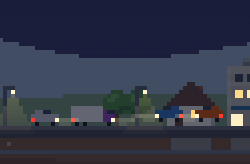
A little pixel-art river city that builds itself on your desktop.
I got bored of my desktop wallpaper, so I made one that’s never finished.
Pixel City starts as an empty riverbank. Pavers roll out the road. Survey crews stake out lots, excavators dig, pile drivers pound, cranes go up, and buildings rise one floor at a time. Small houses get bulldozed for apartments, and apartments get bulldozed for towers. Leave it running and you’ll have a skyline by dinner. Come back the next morning and it’s grown while you were gone.
What’s going on in there
- A real day and night cycle that follows your clock: sunrise, sunset, and office lights that flick on as people get home
- A river with barges, a guy fishing, kayaks in summer, and once in a while a paddlewheel riverboat
- Skyline reflections in the water that look best at night
- Seasonal weather: rain, storms with lightning, fog, and snow that piles up on the roofs. Heavy rain floods the river muddy brown, and a hard freeze sends ice down it
- It catches up while your PC is asleep or off, up to a day’s worth of building
- Built to be light: one small file, nothing to install, easy on your CPU
It never touches the internet.
This edition has no networking code in it at all. The weather is made up on your PC based on the time of year. No accounts, no tracking, nothing leaves your computer. A wallpaper shouldn’t need your data.
(A Live Weather edition that matches the real weather outside, opt-in only, is coming soon.)
What you need
- Windows
- Lively Wallpaper (free, also on the Microsoft Store)
Install
- Download the zip and drag it into Lively.
- Right-click it and set it as your wallpaper. With two monitors, pick Span. It looks great stretched across both.
- Important: in Lively’s settings, turn on the browser disk cache. Otherwise Lively forgets your city every time it restarts.
- Right-click and choose Customize for weather, build speed and frame rate.
How it was made
I’m a sales guy, not a programmer. I built this with Claude over a few evenings, then had GPT do an independent security and privacy audit before release. That’s what Regular Intelligence is about: regular people making real stuff with AI.
Made by Jack Sudonym · Regular Intelligence
Download
Install instructions
PixelCity Install
- Download the zip and drag it into Lively.
- Right-click it and set it as your wallpaper. With two monitors, pick Span. It looks great stretched across both.
- Important: in Lively’s settings, turn on the browser disk cache. Otherwise Lively forgets your city every time it restarts.
- Right-click and choose Customize for weather, build speed and frame rate.


Leave a comment
Log in with itch.io to leave a comment.